The Setup Underneath
In Which One Needs Me I explain how I pass work between agents and get their reports back. If you'd like to try it, here's the setup. I use Ghostty, herdr, 23 keybindings and about 220 lines of shell. I'll show you the config and what gave me trouble.
Ghostty
Ghostty is fast and native on macOS. You don't need a config file to start. Mine only has a few lines. I need this setting for the agent shortcuts:
# ~/.config/ghostty/config
macos-option-as-alt = left
On a US layout, Ghostty treats Option as Alt by default, so you can bind alt+h. But it does that to both Option keys. Because I also need Option to write in Spanish (where typing option+n followed by n gives me ñ), having both keys act as Alt breaks typing accents.
With left, I can use the left Option for the 23 shortcuts below and keep the right Option for accents. I didn't need to turn on Alt everywhere. I needed one Option key for shortcuts and the other working normally so I could write in Spanish.
I also have these bindings, which are separate from herdr:
keybind = cmd+d=new_split:right
keybind = cmd+shift+d=new_split:down
They create Ghostty's native splits outside a herdr session. I keep one for things I don't want an agent to inherit as a pane later.
If you're trying to dim inactive panes, unfocused-split-opacity won't help inside herdr. It only affects Ghostty's native splits (the default is already 0.7). herdr draws its panes within one terminal surface, which means Ghostty can't see them individually, so the borders and highlights inside the session come from herdr.
herdr
tmux doesn't know what's running inside a pane, and I need to know whether an agent is still working or waiting for me without opening each pane to check.
herdr calls itself "the agent runtime". It's free (Apache 2.0). It has workspaces, tabs inside those and panes inside the tabs, like a terminal multiplexer. It also recognises the agents and follows their state. There are five:
| state | what it means |
|---|---|
working | running. Leave it alone. |
blocked | it hit an approval or a question. It needs you now. |
done | finished its turn, ready for input. |
idle | ready, nothing pending. |
unknown | an agent is there but herdr cannot classify it. Not proof of anything. |
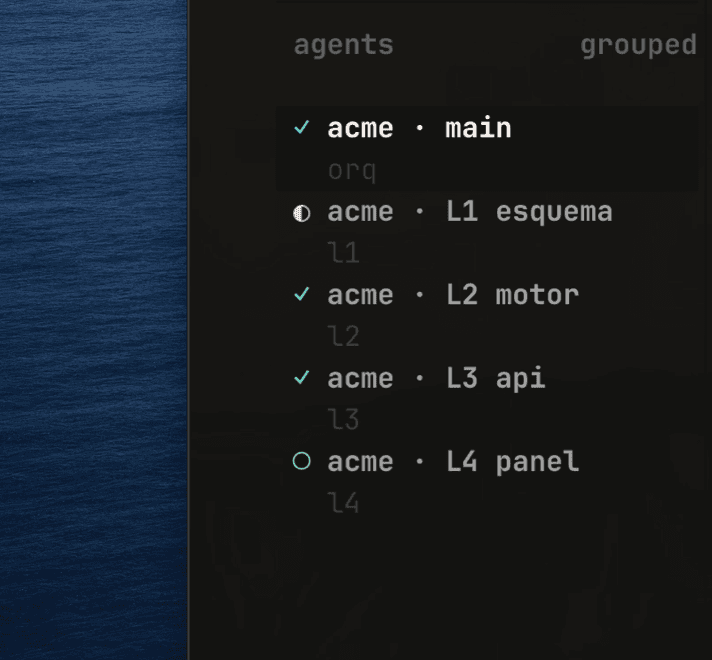
I moved because tmux couldn't tell me if an agent was blocked or just finished. If it's waiting at "do you want to allow this command?", it stays there until I see it, which is how the 9 minutes of waiting in the other post happened.
herdr recognises 20-odd agent kinds. herdr agent lists them. I use three, and explain the cost choices for each level in the other post.
The keys
herdr uses a prefix like tmux: you press ctrl+b, then another key. I do this about 400 times a day, so I wanted to use one shortcut instead of two keystrokes.
I bound Alt plus a key in Ghostty to send the raw prefix byte and the letter together:
keybind = alt+key_h=text:\x02hSince \x02 is ctrl+b, herdr gets the same prefix sequence as before, but I press the shortcut once, with no mode to enter or timeout to wait for.
The binding uses key_h instead of h. That's Ghostty's name for the W3C key codes, where that key is called KeyH. The spec says the values "are based only on the key's physical location on the keyboard and do not vary based on the user's current locale".
That doesn't matter for h j k l since US and Spanish layouts are both QWERTY and those letters don't move, but ;, [, ] and the backtick do move between layouts. Because I bind the physical position on the keyboard, I can keep pressing the same key when I change layouts, even if the character changes.
- h j k l panes · z zoom · v s split
- ` ; last pane · g goto · b sidebar
- [ ] tabs · c new · tab spaces
- a agents · shift: w n r t x
- every binding is alt + this key
- read by position, not by letter
The pane shortcuts are on the home row, so h j k l moves between panes like vim and I can reach them with one hand.
I like alt+a because it goes through agents only, skipping shells, servers and log tails. I don't need to stop on those when I'm checking who needs me.
The last pane also has a binding on alt+backquote. Since I've got a 68-key keyboard and the backtick needs fn+esc, that's awkward to reach, so I usually use ; instead. It's right under my right little finger.
The full list is in the toggle below. If you're going to install this, use github.com/Vader-7/ghostty-herdr. It has the config files, preflight script, shell hooks and an installer that backs up what it replaces. I can update the repo when the tools change. This post will probably fall behind.
All 23 bindings and the config
The middle column is what herdr actually receives, which is the useful part if you want to remap it:
| I press | herdr gets | what happens |
|---|---|---|
alt+h alt+j alt+k alt+l | prefix+h/j/k/l | move to the pane left, down, up, right |
alt+z | prefix+z | zoom the pane to fullscreen |
alt+v | prefix+v | split vertically |
alt+s | prefix+- | split horizontally |
alt+; | prefix+u | back to the last pane |
alt+g | prefix+g | goto: jump anywhere by name |
alt+b | prefix+b | show or hide the sidebar |
alt+tab / alt+shift+tab | prefix+a / prefix+A | previous / next workspace |
alt+a / alt+shift+a | prefix+d / prefix+f | previous / next agent |
alt+[ / alt+] | prefix+p / prefix+n | previous / next tab |
alt+c | prefix+c | new tab |
alt+shift+w | prefix+w | workspace picker |
alt+shift+n | prefix+N | new workspace |
alt+shift+r | prefix+W | rename workspace |
alt+shift+t | prefix+T | rename tab |
alt+shift+x | prefix+x | close pane |
This is the part to copy, and it is the whole set, because one example line will only ever give you one working shortcut:
# ~/.config/ghostty/config
keybind = alt+key_h=text:\x02h
keybind = alt+key_j=text:\x02j
keybind = alt+key_k=text:\x02k
keybind = alt+key_l=text:\x02l
keybind = alt+key_z=text:\x02z
keybind = alt+key_v=text:\x02v
keybind = alt+key_s=text:\x02-
keybind = alt+backquote=text:\x02u
keybind = alt+semicolon=text:\x02u
keybind = alt+key_g=text:\x02g
keybind = alt+key_b=text:\x02b
keybind = alt+tab=text:\x02a
keybind = alt+shift+tab=text:\x02A
keybind = alt+key_a=text:\x02d
keybind = alt+shift+key_a=text:\x02f
keybind = alt+bracket_right=text:\x02n
keybind = alt+bracket_left=text:\x02p
keybind = alt+key_c=text:\x02c
keybind = alt+shift+key_w=text:\x02w
keybind = alt+shift+key_n=text:\x02N
keybind = alt+shift+key_r=text:\x02W
keybind = alt+shift+key_t=text:\x02T
keybind = alt+shift+key_x=text:\x02x
Five of those actions ship unbound in herdr, so they need the other half of the pair:
# ~/.config/herdr/config.toml
[keys]
previous_workspace = "prefix+a"
next_workspace     = "prefix+shift+a"
previous_agent     = "prefix+d"
next_agent         = "prefix+f"
last_pane          = "prefix+u"
A worktree for each lane
This took me longer to get right than the terminal config. When four agents work in the same directory they can edit the same file, then one stashes and another rebases, and sorting out the resulting diff takes an afternoon.
Each parallel agent gets its own git worktree, letting us check out more than one branch at a time from the same repository. herdr creates the worktree and its workspace together:
herdr worktree create --branch fc-api --label "lane 3 · api"I check which files each task will touch before splitting the work. "Add contacts to the dashboard" and "add the contacts endpoint" both need the same types, so I put them in one lane. They can look independent on the ticket and still need the same file. If that happens, I keep them together.
Starting agents from the CLI
The herdr CLI can do everything the TUI does and returns JSON, which lets the orchestrator start and manage other agents without me setting up each pane.
This is an example from the orchestrator pane getting the pane id from the split response. Don't hardcode or guess the id, because you could start the agent in someone else's pane.
# a sibling pane, same directory, without stealing my focus
pane=$(herdr pane split --current --direction right --cwd "$PWD" --no-focus \
  | jq -r .result.pane.pane_id)

# a named agent in it
herdr agent start reviewer --kind codex --pane "$pane"

# hand it work, and wait for it to settle
herdr agent prompt reviewer "Review the diff on this branch. \
  Report only findings that would break something." --wait --timeout 120000

# read the answer back
herdr agent read reviewer --source recent-unwrapped --lines 120
Check these before you let another agent use this.
Use --no-focus for background work. If you don't, it can move your cursor while you're typing in another pane.
--wait returns when the agent's in a settled state, which includes blocked. The prompt came back, but that doesn't mean the task is done, so check agent get before you go on.
agent prompt won't type into a blocked agent, returning agent_blocked and sending nothing. Good. I don't want an agent answering a permission dialog it hasn't checked, especially if the command waiting there is something like rm -rf.
Use recent-unwrapped if you need to parse the answer, since visible still has the viewport's soft wraps. If you ask for more lines and still get a short answer, the agent's using the alternate screen and those missing rows aren't there anymore. Tell it to write the answer to a file and read that.
Shell scripts
I use a few scripts around this. They're small and I like having them.
The agent CLIs update before herdr opens. They keep shipping changes that break things, so herdr-preflight reads my list of agent kinds and runs each updater. It's my own script (it doesn't come with herdr), with a 90-second limit per update running at most once every 12 hours.
It starts from .zshrc only in a fresh Ghostty window, because it can't run inside herdr or it'd repeat for every pane:
if [[ $- == *i* ]] && [[ $TERM_PROGRAM == ghostty ]] \
   && [[ -z ${HERDR_ENV:-} ]] && [[ -z ${CLAUDECODE:-} ]]; then
  herdr-preflight
fi
I lost an evening on this. The updaters looked like they'd worked but hadn't done anything, because several of these CLIs check if they have a terminal and exit silently with status 0 without one. Now I run each under script -q /dev/null to give it a pty, keeping stdin closed so an unexpected prompt fails instead of hanging the shell.
The wallpaper also blurs when a work command starts. A preexec hook swaps the Ghostty background for a blurred copy, and precmd puts it back, using a lock file per PID to keep it blurred until the last pane stops. It follows the command, so an open agent keeps the blur on even while waiting for me. It doesn't tell me more than the sidebar. I just like how it looks while something's running.
I also have two sounds and a notification that waits. The sound and toast settings aren't in the same section, which took a while to notice. Under [ui.sound], herdr calls the attention state request rather than blocked:
# ~/.config/herdr/config.toml
[ui.sound]
done_path    = "sounds/done-purr.mp3"     # the agent finished
request_path = "sounds/request-tink.mp3"  # the agent needs you

[ui.toast]
delivery      = "terminal"
delay_seconds = 5
I use two macOS system sounds turned down by 8 dB, and their paths are relative to the config file. The 5-second delay is for the toast. If the agent unblocks itself in under 5 seconds you don't get a notification. Without that wait I think I'd have turned notifications off within a week, but this way I leave them on.
Trying it
If you want to copy this, I'd start in this order:
- Install Ghostty. Set
macos-option-as-alt = left. - Install herdr and use the default
ctrl+bprefix for a week. Get used to the states before changing the keys. - Start with 10 keys from the 23:
h j k l, the workspace pair, the agent pair and both splits. Add others when you find you need them. - Then try worktrees. They've helped me the most, but I'd get comfortable with the rest before adding them.
I spend very little time navigating now. Most of my time goes into deciding what the four agents should do next, which is harder, and I'd rather spend the afternoon on that than finding their windows.